


In an earlier article on this blog, I have proposed automating website usability evaluation as a means towards mainstreaming website usability within web design and development companies. This is because I view automation as an excellent solution towards overcoming the limitations which are causing the development of websites with poor usability.
At the end of the article in question, I have listed a set of 7 specifications that a tool aimed at automating website usability evaluation must have. In this article I will discuss how I developed a prototype of such a tool which I called USEFul (USability Evaluation Framework).
The objective of this article is to contribute towards the barely explored field of automated usability evaluation by discussing the approach I adopted to develop this prototype. It is written in a language that is easy to follow. If you are interested in the technicalities of the USEFul framework, I recommend that you download the research paper which I have published in the International Journal of Human Computer Interaction (Vol 2. Issue 1. pp.10-30).
The Architecture of the USEFul Framework
The essential features of the USEFul framework are that it:
- Fully automates the usability evaluation process by automatically analyzing the HTML and CSS of a website, automatically referencing usability guidelines, automatically checking if the website being analyzed violates any of these guidelines and automatically providing recommendations to the user on how to fix the violations detected.
- Has been specifically developed to evaluate usability. It is not an accessibility or site optimization tool that is being (wrongly) used to determine a website’s usability.
- Evaluates the usability of a website by using the inspection method, that is, it inspects the website and checks if it violates usability guidelines. This method has been proven to be the most effective usability evaluation method.
- Is flexible. The evaluation logic and the guidelines that are referenced are separate so that guidelines can be modified without altering the code that references them.
- Is web-based, thus enabling remote usability evaluation.
- Has been successfully tested for its ability to evaluate websites by automatically referencing 242 website usability guidelines which have been compiled from 520 published sources. The full set of tests and results will be published in a future article on this blog.
In order to make the above features possible, the USEFul framework is composed of 5 components as shown in the diagram below:
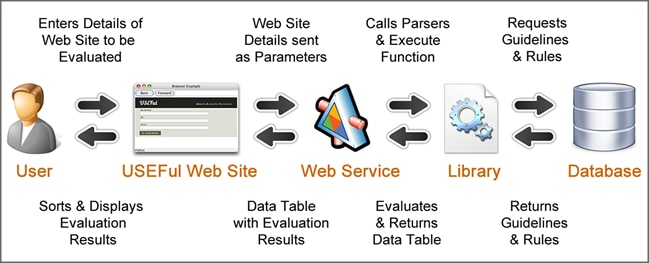
How Usability Guidelines are Incorporated into USEFul
In the USEFul framework, the guidelines and the evaluation logic (the pattern-matching techniques through which the framework is able to detect if a website violates a guideline) are separately stored. This means that the same pattern matching rules can be applied to different guidelines and vice-versa. Additionally, this means that if new guidelines need to be added, deleted or modified, the evaluation logic need not be changed. This essentially implies that a non-programmer can alter the guidelines. It also means that different sets of guidelines can be simply plugged in by altering the path of the line of code that is referencing the database.
One of the major challenges that was experienced when developing the prototype was how to convert the guidelines into a structure that can be automatically referenced by the framework. The way this was achieved can be summarized in the following 3 steps.
- Step 1 – Take the Guideline as expressed in natural language: For example,
Guideline#81 states that URLs in links should not be complex and should be less than 50 characters long - Step 2 – Convert the Guideline into the HTML pattern that you want to find: For guideline number 81, we are looking for an HTML code that is similar to this pattern:
{code type=HTML} .. {/code}
- Step 3 – Incorporate the Pattern into the Rules Table in the Databse: Thus, the above pattern for guideline number 81 would be incorporated into USEFul database as shown below:

A rule would then be created that is able to understand the above table entry and detect if it has been violated. Guidelines that are similar to guideline#81 (but with different conditions) would still be entered in the same table as guideline#81 and thus the same rule can be used to detect the pattern for these guidelines.
How USEFul Works
The process from when the user specifies the website that will be evaluated till when the USEFul framework returns the usability evaluation results can be summarized in the following 6 steps:
- Step 1 – The User Specifies the Website: As shown in the screenshot below, the user needs to key in the name, URL and (optionally) the tag line of the website.
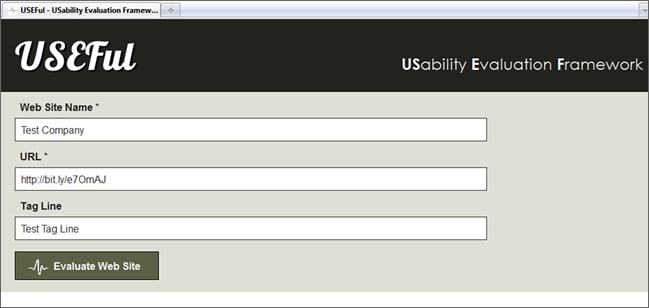
The “Home Page” of the USEFul Framework through which the user specifies the website that needs to be evaluated - Step 2 – The USEFul website Passes the Details to the Web Service: On pressing the “Evaluate” button, the site automatically passes the data to the web service.
- Step 3 – The Web Service Configures the Library: The web service accesses, loads and parses the HTML and CSS of the web site.
- Step 4 – The Web Service Retrieves the Guidelines: The web service uses the library to communicate with the database to fetch the data stored in the guidelines and rule type tables.
- Step 5 – The Web Service Uses the Library to Evaluate the Website: The execute function in the library sees which rule it has to apply in order to establish whether a usability guideline is being violated. For example, in the case of guideline number 81, for each “a” tag that it encounters, the web service will check if the pattern applies. Based on the conditions for violation, it will then determine which of the guidelines have been violated.
- Step 6 – The Web Service sends the information back to the USEFul website: so that the latter displays the results of the evaluation as shown below:
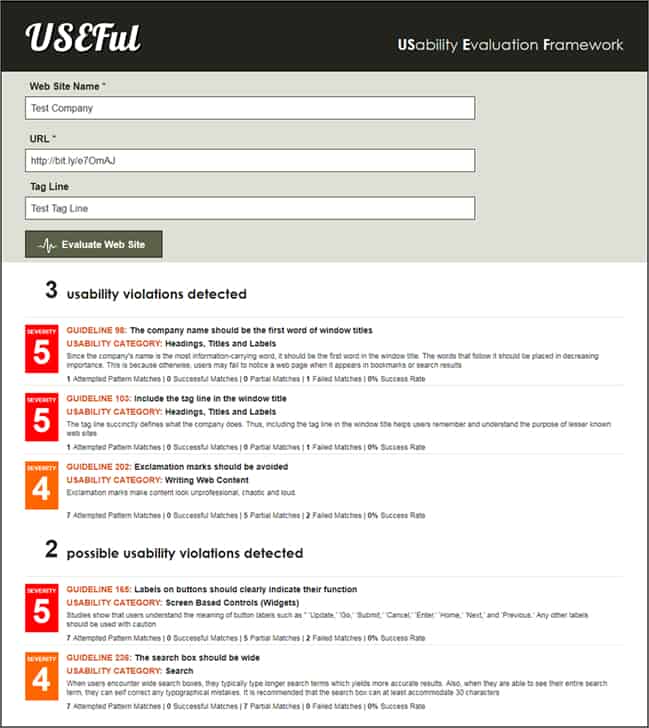
The above screenshot shows the result of a usability evaluation as displayed by the USEFul framework
As it can be seen in the screenshot above, based on the pattern matching results, the framework automatically separates the results of the evaluation where the pattern has been detected beyond a reasonable doubt (usability violations detected) and where it is likely that a violation has occured (possible usability violations detected).
Moreover, for each violation that has been detected, the framework displays the following additional information:
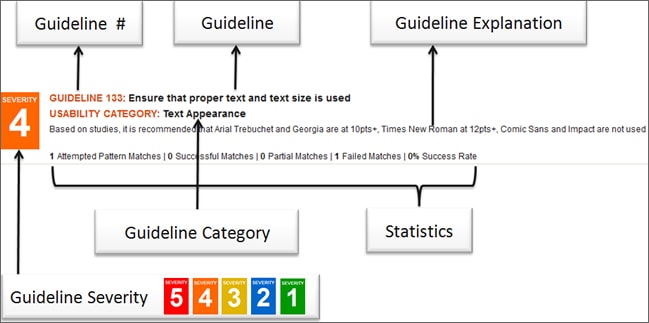
End of Part 1
This marks the end of Part 1 of this 2-Part Article. Part 2 contains a full example of how USEFul evaluates a website (including a video). It also contains the results of the tests that I have carried out with it, and the conclusions I managed to draw from them.
Want to learn more?
If you’d like to…
- get an industry-recognized Course Certificate in Usability Testing
- advance your career
- learn all the details of Usability Testing
- get easy-to-use templates
- learn how to properly quantify the usability of a system/service/product/app/etc
- learn how to communicate the result to your management
… then consider taking the online course Conducting Usability Testing.
If, on the other hand, you want to brush up on the basics of UX and Usability, then consider to take the online course on User Experience. Good luck on your learning journey!
(Lead image: Depositphotos)
