Windows 8 vs. Windows 7 – Speed And Performance Testing

Windows-8-vs-Windows-7-Speed-Performance-Testing
Released on the 26th of October 2012, Windows 8 was Microsoft’s response to the increase in the huge popularity of operating systems in a short period of time. Almost 3 months on, Windows 8 is attracting individuals spanning over every age group. We have heard much about the new user interface, including that it is disappointing. At this point we feel that initial reactions with regards to its usability and user experience where the user interface is concerned has been extensively covered. Therefore, we decided to take on another perspective that can be a source of bad user experience. I am speaking about speed and performance

The Experiments

To obtain an unbiased view, together with my colleagues we conducted a number of speed and performance tests so as to compare Windows 8 with Windows 7. For this purpose we have carried out tests such as boot up and shutdown times, file copying, browsing, gaming and similar synthetic benchmarks on two identically machines. To ensure fairness, we also ensured that both versions of Windows were identically configured.

1. Startup Time
Windows-8-vs-Windows-7-Speed-Performance-Testing-Start-Up
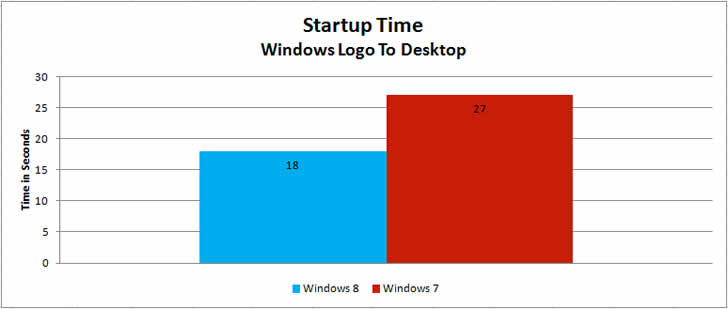
Windows 8 Starts Up faster than Windows 7. Windows 8 took 18 seconds while windows 7 took 27 seconds. Calculated diff1erence is 8 seconds.

2. Shutdown Time
Windows-8-vs-Windows-7-Speed-Performance-Testing-Shut-Down
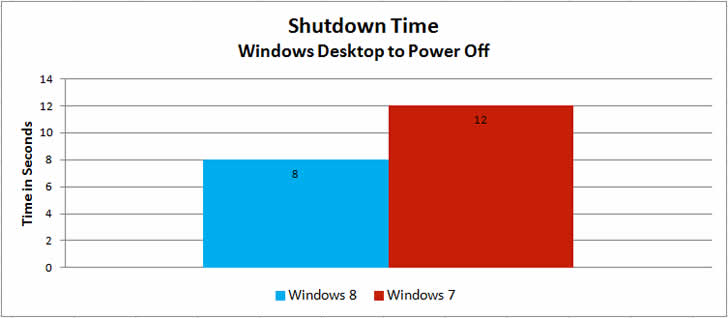
A similar improvement is seen when measuring shutdown time. Windows 8 took 8 seconds versus the 12 seconds in windows 7. Calculated difference is 4 seconds.

3. Wake-up From Sleep
Windows-8-vs-Windows-7-Speed-Performance-Testing-Wake-Up
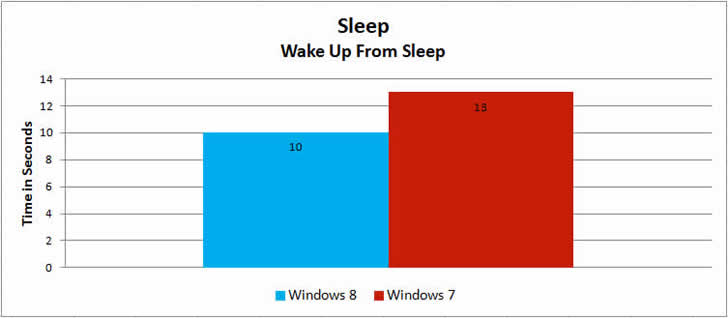
Windows 8 shows a marked improvement here as well. However we still thought 10 seconds was too long. We then tested Windows 8 using our SSD and the exact same 10 second window was repeated. While windows 7 took 13 seconds.

4. 3D Graphics Performance
Windows-8-vs-Windows-7-Speed-Performance-Testing-3D-Graphics
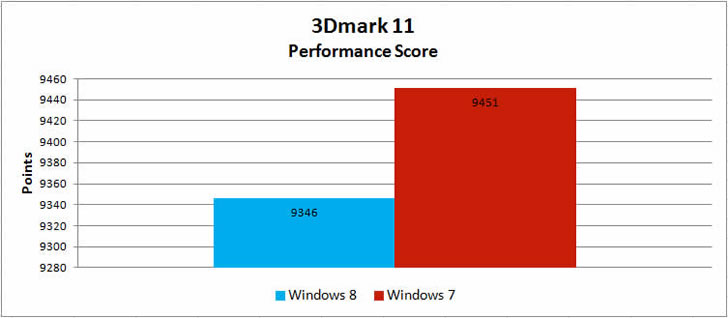
3Dmark 11 is used primarily to measure 3D graphics performance – meaning graphics card drivers play a vital role here. Still, the performance was very similar on both operating systems, though the more mature Windows 7 was slightly faster.

5. Multimedia Performance
Windows-8-vs-Windows-7-Speed-Performance-Testing-Multimedia-Performance
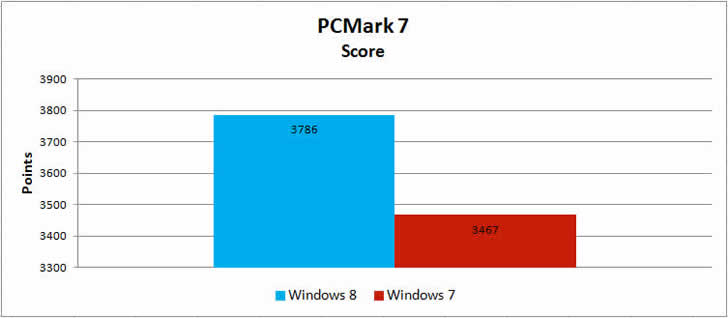
Multimedia performance is said to be another of the strengths of Windows 8, and as you can see when testing with PCmark 7, it was 9% faster than its predecessor.

6. Microsoft Excel
Windows-8-vs-Windows-7-Speed-Performance-Testing-Microsoft-Excel
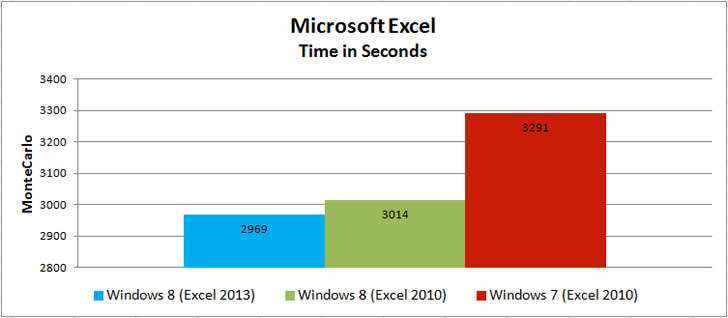
Comparing Windows 8 armed with the new Office 2013 suite we found that it was 10% faster when running our Excel test against Windows 7 using Office 2010. Even when comparing apples to apples, with both operating systems running Excel 2010, Windows 8 is more efficient using the CPU cycles to its benefit on simulation.

7. Transferring Multiple Large Files Together
Windows-8-vs-Windows-7-Speed-Performance-Testing-Large-Files
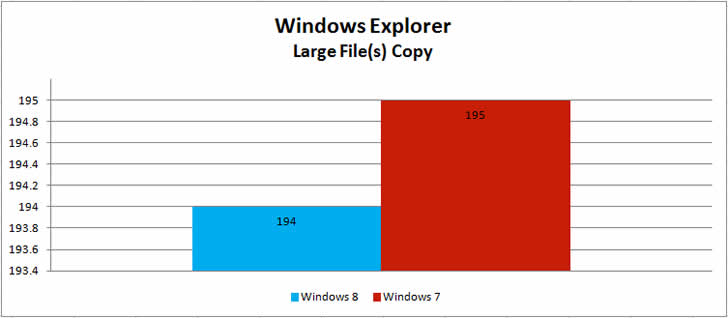
Windows 8 features a new Explorer interface for transferring files, which provides more accurate data on transfer speeds and estimated time of completion. It also stacks multiple transfer windows together. The user interface is awesome, but on the performance side of things there is little difference when transferring multiple large files together or individually. Windows 8 and Windows 7 deliver similar performance in both situations.

8. Transferring Multiple Smaller Files Together
Windows-8-vs-Windows-7-Speed-Performance-Testing-Small-Files
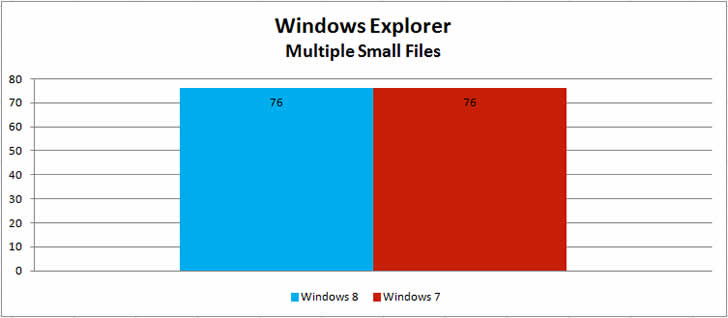
When transferring thousands of smaller files we also found that Windows 7 and Windows 8 offer the same performance.

9. Different Browsers with Windows 7 and Windows 8
Windows-8-vs-Windows-7-Speed-Performance-Testing-Browsers
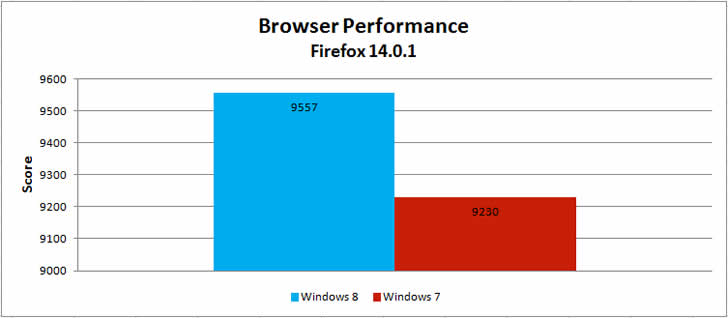
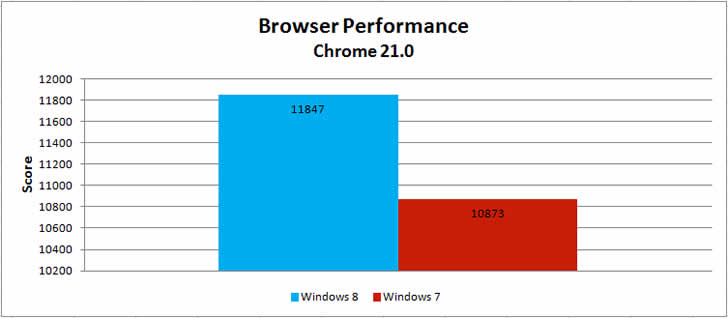
As you can see, the desktop version of the IE10 browsers on Windows 8 delivered virtually the same performance as IE9 on Windows 7. Chrome works better in Windows 8 incomparison with Firefox runing on indentical Windows 8 computer. Also both Mozilla Firefox and Google Chrome perform faster in Windows 8 than Windows 7. Internet Explorer works very slow in all version of windows.

10. Gaming Performance
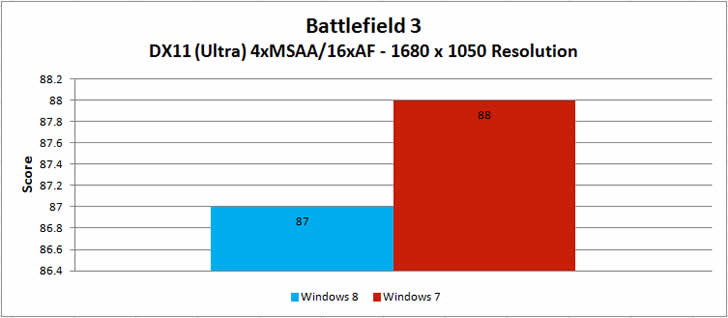
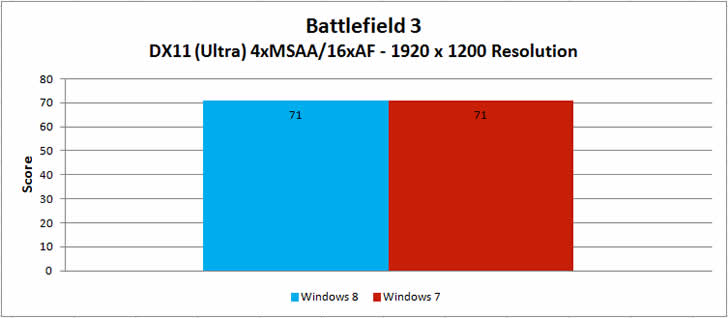
By testing these two performance intensive games on both systems we noticed that both operating systems provide similar performance with a very slight edge to Windows 7′s advantage:

Battlefield 3
Windows-8-vs-Windows-7-Speed-Performance-Testing-Battlefield-3
Looking at the gaming performance for Battlefield 3, it can be observed that both operating systems provide similar performance with a very slight leading edge for Windows 7.

Just Cause 2
Windows-8-vs-Windows-7-Speed-Performance-Testing-Just-Cause-2
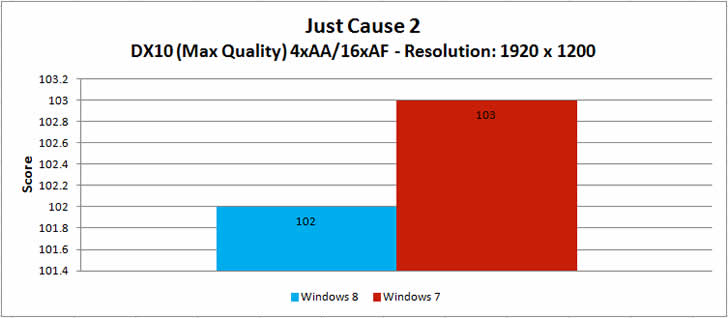
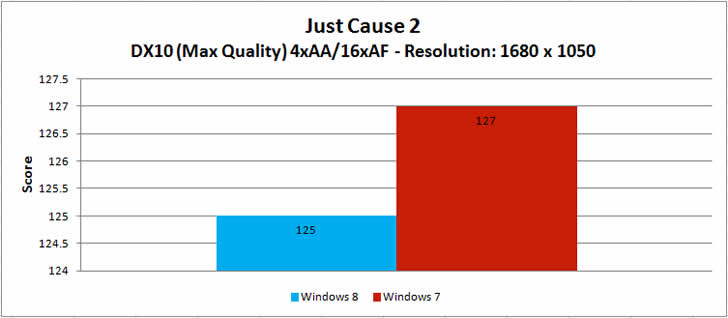
Just Cause 2 runs just a bit faster on windows 7 than Windows 8 for both resolutions 1680×1050 and 1920×1200. The difference isn not significant however. Similar to the previous 3DMark test, this relies on graphics drivers more than anything else.

Conclusion

Microsoft seemed to hit full stride with Windows 7, developing a fast and efficient operating system. Thankfully it seems Windows 8 continues to build on that pattern as we found it to be on par with and occasionally faster than Windows 7. The improvements that have been made to startup and shutdown times are self-evident, and no doubt a major focus on the new OS’ development. This will particularly benefit laptop and tablet users.

At the end we concluded that Windows 8 is faster than Windows 7 in some aspects such as startup time, shut down time, wake up from sleep, multimedia performance, web browsers performance, transferring large file and Microsoft excel performance but it is slower in 3D graphic performance and high resolution gaming performance. Battery life improved enough to be noticeable. Moreover Windows 8 is significantly more secure than Windows 7 and it is basically designed to take advantage of touch screens while Windows 7 is only for desktops. One last word of advice – if you are running Windows 7 on your current PC, then there is no urgency to upgrade the hardware just to run Windows 8…just yet!

  • André

    A very good review and probably the most applicable to the everyday user.

    The big gain seems to be startup and shutdown; I would like to see a review against the first release of Windows 7 and not the version we are using now following countless updates and service packs over the past few years which seem to continually add core files required at start up.

    I will stick to 7 for now and thanks for confirming my own gut feel.

  • Marcin Kozyra

    Good article in my personal opinion windows 7 should not be upgraded to the windows 8 as power users in corporate world work faster on 7 than 8… I realize that there is a way to install old interface with old start button but still users prefer feel and look of 7

  • Yingying

    Good post! I am a user for both Win7 (company) & Win8 (home). I did notice that win 8 has a much faster start-up speed. However, I don’t know whether it will slow down as I store more files and install more programs. We’ll see :)

  • Jiri

    To be fare, I would like to see comparison of Win 8 shutdown to Win 7 Hibernate, since that is what the new OS is doing.

    • http://www.facebook.com/people/Rob-Rivers/100003264342264 Rob Rivers

      I used hiberate in both win 7 and win 8, I have to say, unscientifically speaking because I never actually measured it with a timer, I believe win 8 is at least a few seconds faster. They both are off cold right around 20 seconds.

  • Utkarsh

    in my opinion windows 7 is better than windows 8 for now but don’t know of future which will be better ….. this was good info about win7 vs win 8….

  • http://twitter.com/techherding Dick Carlson

    I wish you’d measured things like “finding the g@@-damned Control Panel” or “figuring out how to shut the damn thing down”.

    • http://twitter.com/EnragedN3wb Kyle Ernst

      Right click in the bottom left corner & click “Control Panel”. Not exactly rocket science. Also most desktops default to pressing the power button once begins shutdown.

    • http://www.facebook.com/orv.williams Orv Williams

      WINKEY+X then click.
      You will notice you can access tons of system operations from this little gem.
      I find that far MORE convenient than previous Windows Start Menus.

    • http://www.facebook.com/mrcaiorodrigues Caio Rodrigues

      Control panel? Hit the win button and write “control panel”. Shut down? Hit the win button and write “shut down”. Everything u want? Just the button and search for it.

  • khen

    windows 8 is a graphical user interface

    • Gunnar Middleton

      so is every windows OS since 1.0x… I am sure you mean the metro interface, but just pointing it out…

  • okuhle94

    I’m still stuck on whether upgrading to Windows 8 from Windows 7 will be worth it. I just want my games to run faster, but reading this article, Windows 7 still faster at gaming.

    • http://twitter.com/Kiljoy616 Kiljoy616

      Your games will not run faster, see this is what I mean most people saying windows 8 is better have no idea how hardware or software works and what OS can and don’t do. Your games will run the same speed unless MS has put more code in there to slow it down. Games want the OS to get out of the way so don’t expect speed boost in games, good video drivers and hardware do that.

  • http://www.facebook.com/enoc.chacon1 Enoc Chacon

    In my honest opinion i would choose windows 7 over 8 and any other OS any day 7 is great business wise, gaming, multi-tasking and very user friendly, but then again that’s just me

  • http://www.facebook.com/profile.php?id=100000136444337 James Üu

    Ive done this already. Many says Windows 7 is better. Make ur calls/predictions official.

  • Zavier Brewer

    It is a good review. I have used Windows 7 and Windows 8 (in my opinion) I prefer Windows 8, yes it was a little harder to find the control panel because i was used to Windows 7 but within 1 minute I was able to find it in no time. I don’t know why people are making such a big fuss about Windows 8. I am not a big fan of the new UI interface but I got used to it and it feels much better and faster then windows 7. What do you guys think?

    • michael yi

      i think that you don’t use your computer enough

    • jason kinney

      Change and frustration autmaticly makes a product bad.

    • Odo Nelle Balaga

      Agreed… :)

    • Odo Nelle Balaga

      i agree with you Zavier Brewer, just on the first use you wll find it hard., but if you can do some customization, like pinning application icons on the start screen, it’s way better than windows 7

    • Odo Nelle Balaga

      in terms of device drivers, no problem to me at all., i used my win7 device drivers

  • Pedro Rodríguez de Oliveira

    If somebody has doubts on installing W8, use Virtual PC or VirtualBox to make a decision. I did it and I haven’t changed my W7.

  • http://www.facebook.com/profile.php?id=100000136444337 James Üu

    Ive done this already. Many says Windows 7 is better. Make ur calls/predictions official.

  • Penile

    move the mouse into the lower left corner/ hit ctrl+C/ or swipe from the right hand side and select power. the power options then show up.

    • http://twitter.com/Kiljoy616 Kiljoy616

      So what makes it better is that it add layers of complexity for a desktop. Its a tablet OS that morphed with the help of Windows 7 into 8. Not impressed. But for those who must have new eye candy I can see the appeal.

  • http://twitter.com/prayboii Jaspher Balmes

    many still want the old version.. windows 7. it seems that it got more votes in frinzee. Most people want it rather than windows 8

  • http://www.facebook.com/m.sarmad.malik Sarmad Malik

    windows 8 is better but not very efficient in working,,,,windows 7 is user friendly and the only thing wich is prominent in windows 8 is it’s user interface and graphics but according to working 7 is better

  • http://www.facebook.com/m.sarmad.malik Sarmad Malik

    i am using both 7 and 8 but 7 is better because of different compatible softwares….

  • William

    Thanks for the information Ahmed .

  • Sathya

    hello guys…..Recently i was using win 8.the following drawbacks are identifying in my laptop..
    1)battery backup is 100mins only i.e.if it shows 60%battery time is 60 mins.
    2)small bugs such as brightness adjusting keys,wireless lan key were not worked..
    3)game is very sow even though having 1gb graphics card..
    4)problems in installing software like .net
    5)heat emmitted very high,fan speed too very fast even playing low memory game like angry birds,subway surfers..

    plus
    1)start/shut down time

    the above problems are still experienced on my laps..but i dont knw what about others…so please tell me if u knw….
    note:there is no such problems experienced while using win 7,

  • http://www.facebook.com/trax9.pk Mustafa Ali

    Not very impressive, stats are beautiful.. but Microsoft should come up with atleast 50% increase in performance in all areas, whether its gaming or office.

    Thumbs up for Ahmed bhai!

  • Trevor Murphy

    I love the looks of Win 8 and the new Start menu (I heavily customize PC’s) as well as Microsoft integration. I will stick with Win 7 until several programs (not Microsoft) are not compatible with Win 7.

  • http://www.sjfpc.com/home.html Steven J Fromm & Associates

    So if you are going to buy a new computer for business, what operating system would you buy? And if it is Windows 7 can you still buy it?
    Also, should you just get a Core 7 or are Core 5 and 3 acceptable for business. (I run a fairly large tax program during tax season.)

  • http://www.facebook.com/hectoravi Hector Aviles

    I AM A VIDEO EDITING DO YOU WILL RECOMEND WINDOWS 8 FOR VIDEO EDITING….

  • Pingback: Transformar Windows 8 en Windows 7 Visualmente (Restaurar Menu Inicio) | Iyonus

  • Pingback: Transformar Windows 8 en Windows 7 Visualmente (Restaurar Menu Inicio) | Tienes Descargas :: Comunidad de Descargas por Mega

  • przeeemo83

    Just instaling back w7 after 5 months with w8… It feels faster but im getting to many problems and was reinstaling w8 every month. First my laptop stoped responding to restart or shutdown (no fix for that, try everything on the web) than windows update despaired… After that power options gone.. Now after playing metro game restarted laptop and cpu spikes with no obvious reason. No update helps. MS support is bad people complain all over internet no fix… Feels to me its tablet system and im tired of reinstaling system all the time…

Related Posts

Facebook

Google +

Categories